Showing posts with label Early Childhood. Show all posts

Sunday, May 3, 2020

ECC Family Project 2

Image that says ECC Family Project: Make 3 ingredient popsicles
I quite possibly think that this new series is becoming my favorite during this quarantine time. Why? Because I am a mom and I know first-hand how hard it is to manage life! This is a project that kiddos with multiple impairments or typically developing can do with their siblings. 
You only need THREE ingredients and a popsicle mold--easy peasy! I bought these molds in the Dollar Spot at Target awhile back. You can also probably find them at Dollar Tree or order them for a minimal cost. My youngest (she's 6 years old) did the project with minimal support from me. 

a girl smiles and holds a Jell-o box as she mixes ingredients
The other bonus? It wasn't a marathon long project. We were done (including set up, preparation and clean up) in 15 minutes. Boom! The recipe was a find from Pinterest. Here it is: http://poofycheeks.com/2014/06/jell-o-popsicle-recipe/. Now that we have discovered this one, Pinterest has been awesome to find me a dozen more variations. 

a side view of a girl pouring liquid mix into molds
A couple of important notes for maximizing your total Expanded Core learning: 
1. Your child is the one who should be in charge of the set up & clean up (not just the actual cooking). They should pull out the pot for the water, measuring cup, bowl and spoon. This is the part that may take a few extra minutes if they are new to the kitchen scene. Don't do this part with siblings as they tend to be well meaning but give away the answers. Normally I would suggest that your child also buy the Jell-O but we are in a new normal here. Have a quick (seriously--QUICK) discussion on the different flavors of Jell-O if they are new to Jell-O. Talk about the cost (Jell-O and store brand is cheap!).
2. Consider contrast. Notice that I selected dark blue. It is easy to see. If your child has no vision, consider using a tray with all of the ingredients to keep things organized. 
3. If your child has limitations such as multiple impairments, think about how they can actively participate. That's different than being totally independent. Can they hold the box? Open it? Can they stir? You can discuss hot and cold, empty and full concepts easily. Are they very limited with their hands? No worries--go hand-under-hand with them. Not sure how? Watch this super quick and awesome video: https://www.wsdsonline.org/hand-under-hand/ (watch Daniel Makes A Smoothie). 
4. Let them use the stove! The easiest thing you can do on a stove is boil water. Highlight how you know water is boiling without seeing it. You can hear it! 
5. Put your child in charge of cleaning up! That includes wiping down the counter. 

a close up of a girl's hand as she uses a small measuring cup to pour liquid into mold
I have to admit that I was a little nervous about how my little one was going to pour the mix into the containers. I have a small one cup measuring cup. We simply dunked the cup in the mix and then poured it. She did it all by herself. ECC bonus skills: pouring! No vision? No worries! Don't let your child put their finger in (we do discourage it but sometimes you gotta do what you gotta do). Try having them feel the outside of the container while they pour. The water is hot and you can feel it fill up the container. BEFORE they pour have them indicate with their finger where the top of the mold is. This way you know that they know where the top is. 
Freeze for a few hours and enjoy! I didn't add as much sugar as the recipe called for but you can do whatever works for your family. NOTE: for kids with multiple impairments, really play up the temperature aspects of this. There are repeated opportunities to talk about hot and cold. You could easily make a new recipe with a new flavor each week. Once you master these, you can rank up and try the fruit ones with fresh fruit and coconut milk. Go for it! 

Friday, April 19, 2019

Spring & Easter ECC Activities


graphic that says spring & easter activities with the Expanded Core curriculum

Happy spring! Spring season bring holidays like Easter and a lot of fun opportunities for Expanded Core instruction. Check out some quick, fun and easy to do ECC spring activities. The bonus: you can do these for Easter, too!

Clearance sign that reads 2.50 above a bin of colorful pillows
a bunny stuffed animal sits on top of bright color pillows
an image of the gym floor with bright color medium and large different types of eggs
Let's start with Easter. One of the most difficult parts of traditional Easter activities is the egg hunt. Many people have adopted the beeping eggs or using balloons on strings. Those are great ideas and I have done them. The problem I ran into with the balloons is that it ended up being super windy and the balloons were blowing around everywhere--gah! The beeping eggs are nice but what do you do if you have students with hearing impairments, in wheelchairs or have under developed sound location skills? That's what I was thinking about this year when putting together our Spring Carnival. 
I was in Walmart gathering supplies when I saw a clearance bin with these colorful, soft and lightweight "egg looking" pillows---yes! They were only $2.50--score! I purchased a handful of these pillows. I knew that they would be perfect "eggs" for many of my students. They are easy to see, fun to touch and lightweight to hold. Yes! They were such a hit! The students used them in so many ways. I made sure that I bought a red one for some of my CVI students. I have many students who use gait trainers, walkers, etc. Check out my Instagram--9MoreThanCore to watch how some of my students used it. 
I also purchase "large print" eggs for $1 because they are easy to see.

an image of a wall with large bright color eggs with buckets

That wasn't the only egg hunt we had. Who say you have to have just one egg hunt when we have students of all different abilities and interests?! My kids have participated in lots of family egg hunts where each child is assigned a color or a sticker for their designated egg. I took that idea and put my ECC thinking cap on. Again, what is an egg hunt that my students can fully interact with? 

I assigned students based on small groups (small classroom sizes) a designated color egg. The big eggs were hung on walls for the hunt. Each classroom looks for multiple eggs of the same color that are mounted to the wall. Each classroom is designated a spring decoration (i.e. bee, flower, polka dot) and will decorate their eggs as they find them. The decorations were in buckets. Students matched their color to their egg and bucket. We used Braille labels on both buckets and eggs for literacy purposes and for students who have no vision.
a large green egg decorated with yellow chics mounted on the wall


a blue bucket with large print word "blue" and Braille label
a close up of the large eggs with braille label "yellow"

It worked out great! Students still did an egg hunt but we packed in a lot of other bonus skills. I considered popular IEP goals (scanning, matching, fine motor skills) and infused them into this and the other activities for meaningful instruction. They were also easy and inexpensive to make! I used poster board from Dollar Tree. I bought a white poster board and used a shiny wrapping paper for one color. They were nice and bright and easy to see. (We laminated them so we can use them again!). We used die cuts for decorations and painters tape for easy application. 
an image of the large colorful eggs taped to the wall

an image of the garden box with garden tools, flowers, etc. inside
Another fun activity was the gardening station. This was a mix of live plants, artificial plants/flowers and gardening tools. I headed to Walmart nursery clearance rack. I wanted crocus flowers because they are super fragrant. I also nabbed some oregano and parsley for their scent and textures. 
I found a great idea from Pinterest for the sensory play component. I picked up some black beans and filled some containers to have "dirt". Bright color artificial flowers provided great contrast. 

a close up of a bee decoration on the garden table.
a close up of the garden table with the flowers and activities

Target Dollar Spot had some great cheap finds! I purchased kids gardening gloves, gardening tools and fun rocks. They also had some fun carrots and veggies that were soft. You can easily open the seam and fill them with some weights to give them a little bit more weight for sensory feedback. (We had the same idea for the spring friends!).  Dollar Tree had these awesome carrot eggs. I filled them with different amounts of beans for shaker eggs. I found a super cute bee and lady bug decoration from At Home which added to the garden table.
a close up of the carrot eggs half filled with beans to make shaker eggs

a long decoration of a kite flying in the sky

I always love having a motor activity. I created some motor movements that all my students could do (wheelchairs, supported standers or independent standers). I also added numbers on dowels. Students selected a motor skill and a number. Our PE teacher ran the activity. 

a close up of the motor activity signs "run in place" "clap your hands"

a close up of the motor activities "wiggle your body" and "stomp your feet"

a close up of the dress up table
We had a spring dress up station with all kinds of fun items. Why? We had a parade! A parade infused some fun ECC skills. It was fun to watch students dress up with all kinds of decorations. We worked some fun social skills with smiling and waiving in our parade (very simple parade so we can focus on skills). 

a close up of the spring friends table with different characters on it.
 A lot of my students enjoy music so the spring friends table was just the table for them! I found these fun spring friends that dance and move. I also went to the baby section and found super soft bunnies and a large turtle. Again, you can open the seams and add some weight to provide more sensory feedback. 
a close up of the spring friends table with different characters on it.


a long spring decoration of raindrops on a duck and baby ducks

 You don't need to save these activities for Easter. These are spring activities you can do do throughout spring! Plus, buying these right after Easter gives you a nice savings to your wallet. 

an image of large different eggs


Wednesday, November 21, 2018

Learn About Community Partners Using the Expanded Core

a graphic that reads the title of this blogpost
I just completed my latest ECC kit, Community Partners and I am so excited about it. One of my preschool teachers wanted a kit to help with teaching about community partners. Let me show what I came up with!
First, let me go right to our assessment tools and resources from the Expanded Core Curriculum. This way I can infuse skills in every aspect. I always go to my ECC tools first so I can have a clear picture of what skills, concepts, etc. I need to teach. I hit up the Independent Living Skills Assessment (ILSA) and Elementary Concepts from TSBVI (see earlier posts on using Elementary Concepts). There was a whole unit on community partners in Elementary Concepts so I copied the section for my teachers to use. Lots of good ideas for both core and Expanded Core learning (with art, music, writing, etc ideas). I also found some fun color and cut headbands from Totschooling.net (I signed up for free and they have all kinds of things). 
A picture of the Elementary Concepts community partners unit and the templates for the cut and color headbands
Next I hit up Pinterest and Teachers Pay Teachers to find some ideas and resources that general education is using. Remember, we always want to be in alignment with core and general education because it keeps our students included in their classrooms. Plus, TPT has GREAT finds that are pretty cheap. I love TPT!

Four of the movement community partners cards. For example: brush your teeth like a dentist
I found these awesome movement cards for $3.00 on TPT. They are available in large and small sizes (or in large print as I like to think of it...). Look at how great these cards are!! I had my intermediate grade students do all the Braille for me (bonus ECC instruction as we discussed as they brailled...). *You can't see the Braille labels very well but they are on there!*
I also went and found the props that go with each card. For example, a newspaper, wrench, toothbrush and cut up hose. Now we have meaningful tactual items for the movement. 
Screen shot of the Teachers Pay Teachers store where you can buy the movement cards
I happen to have some preschool items that I purchased for my early thoughts with dramatic play with community partners. You can easily hit up a Kid to Kid or other kids consignment shop for some items. I also purchased some from Lakeshore. Kids love to dress up for dramatic play (plus it's another ECC bonus because you can work on dressing skills!)

a picture of a doctor kit

an image of the mail carrier dress up outfit with Braille label
We added Braille labels to all the print labels on the dramatic play clothes. Add a little super glue (carefully!) so that the Braille labels stick long term. 

a picture of the back of the construction workers vest with Braille label on it

a photo of some of the community partners dress up outfits.

a photo of all the contents in the community partners kit
We packaged up the costumes into large ziploc bags and logged the contents. I like to do this to keep track of things. We are not done yet! We still have more items in our ECC kit. 

I also found this fun idea from Pinterest to build a photo town. Here's the link: http://www.toddlerapproved.com/2015/03/build-around-town-photo-wall.html.
There's lots of good ideas in this post! There are accessibility settings on phones (iPhones for sure) that allows students with vision impairments to take pics with feedback. Go around your town and take pictures of your town to build your photo town. See the post for more ideas. There are so many good ones that are totally doable for our students! Extend your ECC learning by visiting these places and taking your pictures there OR it can be ECC homework for students to do with their families. 
a photo of the blog post for the photo town
I decided to have some starter photos for our town so I Googled some free pics of things and made labels (with Braille on it--can't see in picture). It was easy peasy to make the board. Bonus ECC instruction: you can work in spatial skills directions because you can discuss top/botton, left/right and count squares and use systematic search patterns. 
a stack of photos from places around the community


a photo of the community partners kit
The last part of our kit has to do with signs in the community. We included a number of directional signs and this real working stoplight to talk about navigating around our community. This stoplight totally works! I found it at Hobby Lobby on sale for $40! It's got metal on it so it has an authentic feel. Plus it's great for students who have no vision who always hear people talking about a stop light but have never 'seen' it before. 
a photo of the toy street light from the kit
There is SO much learning that you can do with this ECC Community Partners kit! Other ideas include: asking members of the community to come to your classroom OR scheduling a visit to their location and build an experience book based on the community partners you learned about. Just make sure you hit up our ECC resources to see all the skills from play to compensatory skills that can be included. ILSA is a great tool for this! 
See you in the community!!


Monday, August 20, 2018

Teach STEM & The ECC Using Kibo Robots


Blog graphic that says "Teach STEM & The Expanded Core Curriculum Using Kibo Robots with a pciture of a Kibo robot.
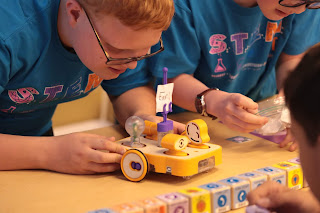
 Happy back to school everyone! I apologize for the big delay but I have been a very busy bee these past few months. I am just settling back in for regular blog posts. I have so much to share! I am always on the lookout for opportunities for our students and I stumbled upon the Kibo robots at STEM Fest last year. I immediately jumped at it because the accessibility would be so easy. Kibo robots are originally designed for early childhood but I find that I can use them for older students, too. I like how I can create simple concept development to pave a good foundation for robotics, engineering and programming. Plus, you can add the A and make it STEAM! They have lots of fun addition parts to be creative. I have used them several times with students and most recently at our Survivor on STEM Camp Island residential camp.
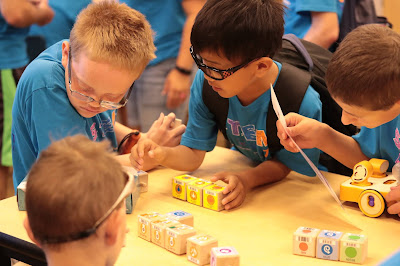
  Elementary age male students writing a program using the Kibo program blocks.
Elementary age male students writing a program using the Kibo program blocks. 
It's not just STEM that we can teach with the Kibo robots. It's about connecting it to the real world and that's where the ECC comes in. I infuse a lot of ECC concepts as I do my pre-teach with the robots such as asking the students how robots work in the real world or creating concept development about what robotics really is. Check out a video about the Kibo robots:
 
A Kibo robot with all four sensors: light, eye, telescope and listening
I have taught with the Kibo robots for students of all ages and visual abilities. My students who are totally blind can use them as can my low vision students. It didn't take much for accessibility either. We did make Braille labels for the programming blocks. The classroom kit comes with a game called Kibo Says. The game has "large print" cards which is what I use with the students who cannot easily see the blocks. You can still scan on them and they totally work. Plus they come with the kit--no enlargement necessary. I also pull out our handy Visolux (see picture below) just for quick magnification and to incorporate use of assistive technology (an ECC area!).
  A Visolux magnifier magnifies the program blocks on the screen.
A Visolux magnifier magnifies the program blocks on the screen. 
The Kibo robots lend themselves well to building concept development--meaning that there isn't a lot of abstract to make tangible. I start my lessons with new students by going piece by piece of the robot and they will build it together so they know each piece. We discuss the wheels and how to lock them in and discuss the function of each sensor. I also specifically discuss how the scanner works (and then discuss where else these scanners exist---a grocery store is a great example as well as a connection to the real world ECC).
A student hand is reaching to work on a Kibo robot.
A student hand is reaching to work on a Kibo robot. 
There are lots of games such as bowling. My students have loved just creating with it. Here is a list of examples of activities: http://resources.kinderlabrobotics.com/activities/. You have to begin each program with a start and an end which is really nice. It is easy to have defined and tangible concepts for students that have no vision. All of the students that I have introduced them to (from grades 3-12) have really liked them.

                                         Kibo Says cards in full size (8.5x11)
                                   Kibo Says cards in full size (8.5x11)


Male middle school student works on a Kibo robot. He is scanning the program blocks to the robot.
Male middle school student works on a Kibo robot. He is scanning the program blocks to the robot. 
You can infuse so much Expanded Core into your Kibo lesson! Think about spatial awareness and directionality (orientation and mobility skills), working with a team (social interaction skills), problem solving, self awareness and making choices (self-determination), all the jobs in the STEM field, following simple and complex directions, cleaning up the Kibo, etc (career education). Those are just a few examples of skills and concepts you can specifically target in your Kibo session. The only accessible thing we did was add Braille labels to the program blocks. Everything else was pretty much accessible. The direction cards did need Braille and LP copies but that wasn't hard at all to do! I've had a great experience working with the company since I purchased these for our school. Give them a call and tell them you heard about it from me!

Friday, December 1, 2017

Teach ECC Using a Daily School Schedule


Hi friends! I wanted to share an easy way to teach the Expanded Core Curriculum: use the daily school schedule! This gem of an idea comes from our talented preschool teacher, Sandra. I was visiting her classroom and saw her fantastic display. I saw her daily schedule and immediately started seeing ECC areas popping out everywhere!
[Picture #1 description: a daily schedule in the formation of two Braille cells. Each dot position has a print and object to represent a part of the day. ]

Check out the close up pictures of the Braille cell formation schedule.  Each dot position has a tactile object, large print and Braille. 


This daily schedule chart is oozing preschool to early elementary ECC concepts! Don't think that this is just a daily schedule. It is an easy way to embed ECC instruction.
 Here's just a quick overview of ECC areas that are covered by this schedule:
compensatory skill areas (more than just the Braille formation, think about concept development, organization, etc.)
career education (following a schedule, the chore chart, etc.)
ILS (time management, responding to the cue with the appropriate action)
orientation & mobility (spatial skills development; knowing the location of the center or activity)
recreation & leisure (following rules--you have to know how to follow rules when playing or participating in a recreation activity)
social interaction skills: the social discussion of what is happening during the day, turn taking)
self-determination (identifying what they can participate in; seeing how they are part of activities)
assistive technology (students can use low tech devices and pre-concept techniques for accessing information)
sensory efficiency (using all senses for concept development. I also want to point out the contrast that Sandra used. It is not a visually complex schedule for students to look at.)


Check out the accompanying chore chart. Chore charts are not unusual in classrooms. This teaches career education. I always want to encourage teachers to use chore charts and assign meaningful chores for students to do. This helps with concept development and foundation career skills. 

I love sharing easy ways where ECC skills occur naturally. That's the key to ECC instruction: find routines where ECC skills naturally occur or are naturally embedded. Hope this makes you think twice about using a daily school schedule!